
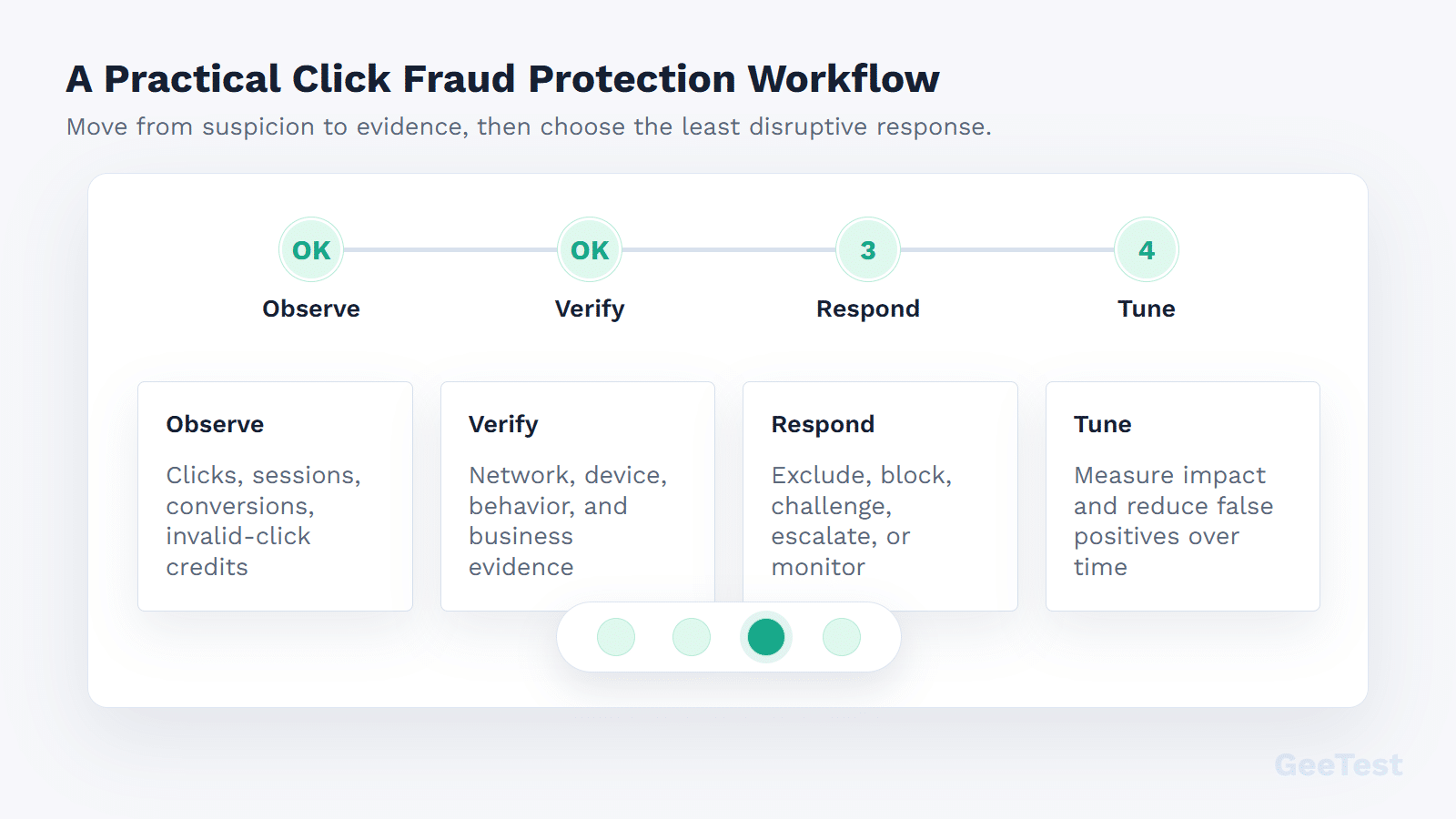
Click fraud protection is not one switch in an ad account. It is a working routine: spot suspicious clicks, compare them with session and conversion quality, decide what evidence is strong enough to act on, and keep real buyers out of the blast radius.
That last part matters. A team can make a campaign look cleaner by blocking aggressively, then quietly lose good demand from shared offices, mobile networks, VPNs, or multi-person B2B buying groups. The better goal is narrower: protect paid spend and conversion data while keeping the path open for legitimate users.
If you need the basic definition first, start with GeeTest’s pillar article on click fraud. This guide is about the operating playbook: what to check, when to review, when to challenge, and where post-click risk controls fit.
When Click Fraud Protection Is Worth the Effort
Most teams do not need an elaborate process for every odd click. The problem deserves a formal workflow when it starts showing up in business outcomes: spend rises but qualified demand does not, lead quality drops, retargeting audiences look strange, trial or signup volume becomes noisy, or fraud teams see more automation after paid traffic reaches owned pages.
1. Budget Waste Is Only One Part of the Problem
The media bill is only the first signal. The messier damage is data pollution. Fake clicks can create shallow sessions, junk leads, odd retargeting pools, and fake account activity. Automated bidding may then optimize toward traffic that was never likely to buy. Sales teams inherit bad leads. Product and fraud teams may later deal with promo abuse, automated forms, or noisy trial usage.
A protection program should track conversion quality, not only prevented clicks. "Blocked 1,000 clicks" is not a business result by itself. Cleaner sessions, better lead acceptance, lower downstream abuse, or reduced wasted spend are closer to the outcome that matters.
2. Tool Claims Need Evidence, Not Blind Trust
Practitioners are right to be skeptical of dramatic dashboards. Before trusting a tool or a block rule, ask a few plain questions:
- Which signal made the click suspicious?
- Did the visitor bounce, submit a form, create an account, or trigger abuse?
- Did enforcement reduce waste without cutting qualified demand?
- Can the team review and reverse decisions?
- Is the evidence strong enough for ad-platform review or internal escalation?
If the answer is "we do not know," start in review mode. The best program is not the one that blocks the most traffic. It is the one that makes better decisions with fewer surprises.
How Fake Clicks Get Through Paid Campaigns
Fake clicks come from different places: bots, rotating infrastructure, click farms, low-quality placements, competitor-driven activity, accidental repeats, and traffic that is human but commercially useless. Labels help, but behavior after the click usually tells the team what to do next.
1. Bots, Click Farms, and Low-Intent Traffic Behave Differently
Bots often leave mechanical clues: repeated device patterns, odd browser signals, tight timing, or sessions that do not behave like research. Click farms can look more human at the click level but fail on intent. Competitor-driven activity may cluster around expensive keywords, narrow regions, or specific hours. Low-intent traffic may not be fraud, yet it can still waste budget if it never becomes qualified demand.
Different sources call for different responses. Bot-heavy behavior may justify filtering or risk-based verification. A placement-quality issue may require exclusions or partner review. A suspected competitor pattern needs evidence preservation first; accusation comes much later, if at all.
2. Google Filters Invalid Clicks, But Advertisers Still Need Signals
Google explains that invalid traffic can include accidental clicks, fraudulent clicks, and automated activity, and that Google Ads uses systems to filter or credit invalid activity. Google also lists invalid-click examples, including manual clicks intended to increase costs and automated clicking tools.
That platform layer matters, but it is not the whole story. Advertisers still need to know whether suspicious traffic reaches forms, accounts, trials, downloads, checkouts, or support workflows. Google can review ad interactions. Your team owns what happens on your site.
Build a Protection Workflow, Not Just a Blocklist
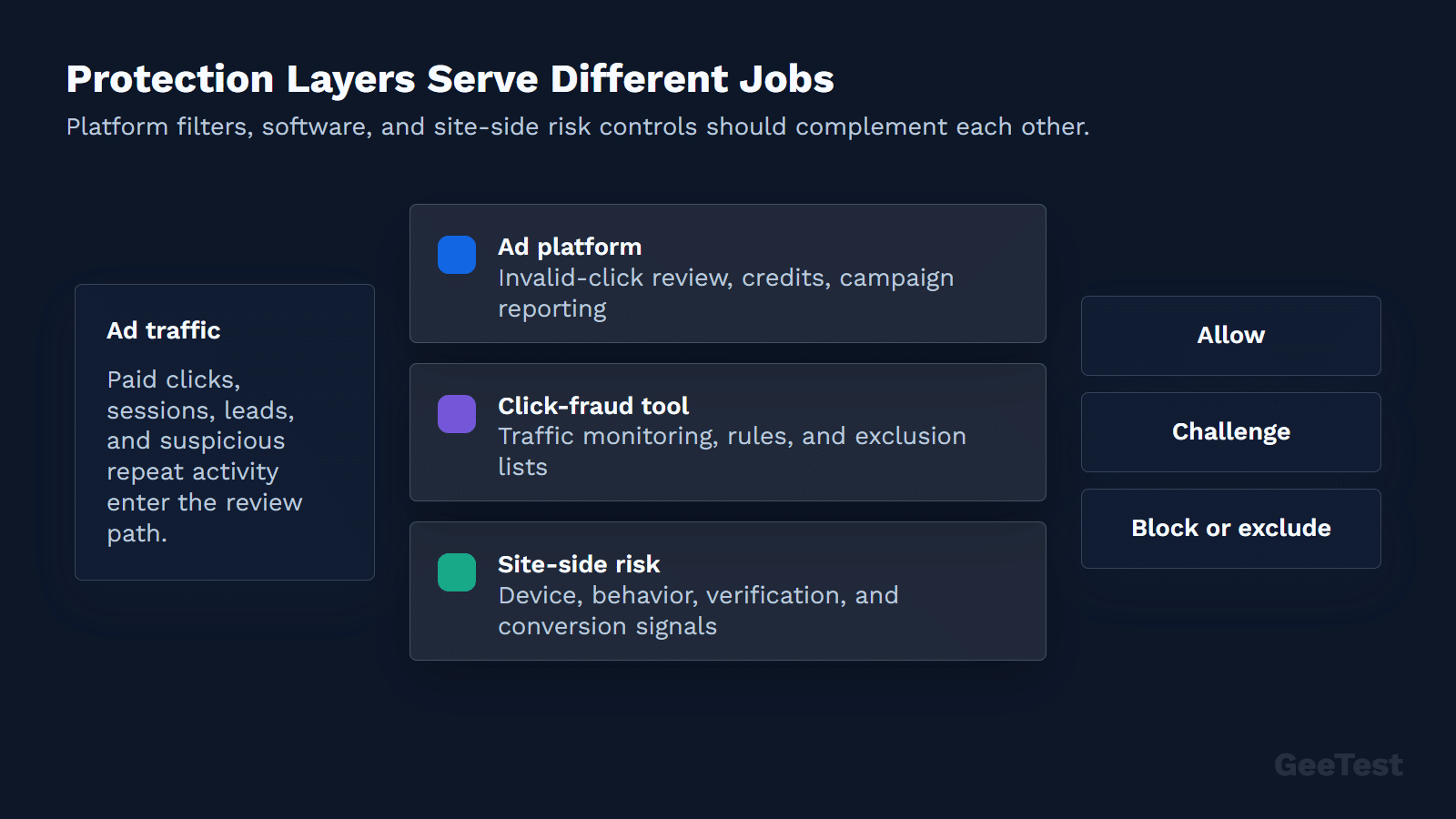
A blocklist is a control, not a strategy. A useful workflow connects click evidence, session behavior, conversion quality, and response rules.
| Layer | What It Checks | Useful Response | Main Risk |
|---|---|---|---|
| Ad platform filtering | Invalid clicks, duplicate clicks, automated activity | Platform filtering, credits, investigation | Limited visibility into owned-site abuse |
| Campaign analytics | Keyword, placement, region, device, time, conversion gaps | Targeting changes, exclusions, budget controls | Overreacting to normal variance |
| Click-fraud software | Click patterns, IP/device/network signals, account integrations | Monitoring, alerts, blocking, evidence reports | Vendor claims without business validation |
| Site-side risk signals | Landing-page behavior, forms, accounts, device/IP risk | Observe, step-up verification, rate limit, block | False positives and conversion friction |
| Risk operations | Baseline, review mode, escalation, rollback | Governed enforcement | Slow response if ownership is unclear |
1. Detect Patterns Across Clicks, Sessions, and Conversions
Start with click patterns: repeated clicks, strange geographies, high-cost keyword spikes, rapid repeat activity, and traffic that does not match targeting. Then compare that activity with session quality and conversion outcomes. A suspicious click that disappears after landing is one risk. A suspicious click that submits forms, creates accounts, or triggers promotion abuse is a different one.
Strong detection joins three views: media data, site behavior, and business outcome. When all three tell the same story, the team can move from suspicion to action.
2. Choose the Right Response for Each Risk Level
Do not start with the harshest action. Use a ladder:
- Observe: monitor the pattern without changing user experience.
- Investigate: preserve click IDs, session data, campaign context, and conversion outcomes.
- Filter: adjust campaign targeting, placements, or exclusions when evidence is clear.
- Challenge: apply verification to high-risk post-click actions.
- Block or escalate: block abusive sessions or submit evidence to the ad platform when warranted.
Low-confidence signals belong in observe or review mode. High-confidence abuse can justify filtering, step-up verification, blocking, or platform escalation. This keeps the team from turning every weak signal into user friction.
3. Preserve Evidence Before You Change Rules
Save evidence before changing rules. Keep timestamps, campaign IDs, click IDs, IP, device, and session indicators where available, conversion quality, invalid-click adjustments, and before/after baselines. If you later add software or site-side rules, the baseline helps you judge whether the change helped or merely made the dashboard look different.
Ownership matters. PPC owners usually manage targeting, exclusions, and platform evidence. Analytics or RevOps teams validate conversion quality. Fraud, security, or product teams review suspicious sessions and downstream abuse. Engineering may own site-side enforcement. Without named owners, click fraud protection becomes a stack of disconnected alerts.
What to Check in Click Fraud Protection Software
Software can help, but the buying checklist should be stricter than "does it block clicks?"
Use this quick checklist when evaluating software:
| Criterion | What Good Looks Like | Why It Matters |
|---|---|---|
| Signal depth | IP, device, network, campaign, session, and conversion context | Reduces shallow blocking decisions |
| Governance | Review mode, reason codes, allowlists, thresholds, rollback | Controls false positives |
| Reporting | Spend, clicks, conversions, lead quality, and response actions | Connects protection to business outcomes |
| Integration | Ad accounts, analytics, CRM or fraud systems where needed | Prevents isolated dashboards |
| Privacy review | Clear data collection and retention boundaries | Keeps security and compliance teams aligned |
1. Detection Signals Should Go Beyond IP Addresses
IP blocking can be useful, but it is thin evidence by itself. Look for signal depth: device patterns, user-agent and browser signals, proxy or data-center indicators, campaign context, session behavior, conversion quality, and account or form outcomes. A good tool explains why traffic is suspicious and how confident the system is.
2. False-Positive Controls Matter as Much as Blocking
False positives are the hidden cost. Good tools support review mode, allowlists, thresholds, rule testing, rollback, and clear reason codes. If a tool cannot show which legitimate users might be affected, it is hard to deploy safely.
3. Reporting Must Connect Clicks to Business Outcomes
Reports should connect suspicious clicks to spend, conversions, lead quality, downstream fraud, and response actions. A dashboard that only reports blocked-click volume may be useful for triage, but it cannot prove business impact on its own.
For a vendor-selection view, the existing GeeTest article on click fraud protection tools can be updated as the comparison hub for this cluster.
Where Bot Management and Risk Signals Fit
Bot management and click-fraud protection overlap after the ad click. Once suspicious traffic reaches forms, trials, signups, logins, downloads, or checkout flows, the business needs a site-side risk decision: allow, observe, verify, limit, or block.
1. Device, IP, and Behavior Signals Add Post-Click Context
GeeTest device fingerprinting can support device and risk-signal analysis when suspicious paid traffic reaches owned properties. Device, IP, environment, and behavior signals answer a different question from the ad platform: does this visitor behave like a real user after the click?
That context is useful because fake traffic often becomes more obvious after landing. It may try to submit forms, create accounts, abuse promotions, request SMS codes, or trigger high-value actions.
2. Verification Should Be Risk-Based, Not Always On
Verification should protect risky actions without punishing normal users. GeeTest Adaptive CAPTCHA can serve as a step-up control when risk is elevated, while lower-risk users continue with less friction. A Business Rules Engine can then help teams map risk signals to actions such as observe, challenge, limit, or block.
The boundary is important. This does not replace PPC click-fraud software or Google Ads invalid-traffic systems. It complements them where paid traffic turns into owned-site risk.
Mistakes That Waste Budget or Hurt Conversions
1. Blocking Too Aggressively Can Damage Real Demand
Aggressive blocking can remove real prospects, especially in shared offices, mobile carrier networks, travel-heavy audiences, or B2B accounts where several stakeholders research from similar environments. Before enforcing a broad rule, test it in review mode and inspect affected sessions.
If a control creates too much friction, the campaign may look cleaner while the business loses real conversions. Track fraud reduction and conversion impact together.
Privacy and compliance review should happen before broad enforcement, not after a complaint. Click fraud protection often touches IP addresses, device signals, click IDs, session behavior, and account outcomes. Those signals need a clear purpose, access policy, retention boundary, and regional compliance review.
2. A Single Metric Cannot Prove Protection Is Working
Blocked clicks, invalid-click credits, conversion rate, lead quality, downstream abuse, and sales acceptance all show different parts of the picture. Review them together. If blocked clicks rise but qualified conversions fall, the rule may be too aggressive. If conversion quality improves while suspicious account activity drops, the protection stack is doing more useful work.
FAQ About Click Fraud Protection
1. Do click fraud protection tools actually work?
They can help when they combine strong signals, transparent evidence, safe response controls, and business-outcome reporting. A tool is weaker when it blocks aggressively without explaining why, or when it cannot show whether conversion quality improved.
2. Does Google Ads already protect against click fraud?
Google Ads has invalid-traffic systems and may filter or credit invalid activity. Advertisers should still monitor campaign, session, and conversion-quality data because ad-platform review does not cover every downstream business risk after the click.
3. How much should click fraud protection cost?
Cost depends on ad spend, click volume, number of accounts, channel mix, required integrations, service model, and risk tolerance. Do not judge cost only against blocked-click counts. Compare it with wasted spend, staff time, conversion quality, and downstream fraud exposure.
4. Can CAPTCHA stop click fraud?
CAPTCHA does not stop the ad click itself. Risk-based verification can help protect high-risk post-click actions from bots, such as forms, signups, logins, downloads, or account activity. It should be one layer in a broader protection workflow.