
Preventing data harvesting usually begins with a slightly dull job: finding the places where information can be collected too easily. The obvious public page is only one surface. Search results, mobile APIs, export tools, account recovery screens, review forms, and third-party scripts may expose cleaner data than the page a visitor sees.
Once that map exists, the work becomes much less abstract. Reduce what does not need to be exposed. Put limits around cheap repeated collection. Watch for automation patterns. Add verification only when the request reaches a surface where abuse would be expensive.
Start by Mapping What Can Be Harvested
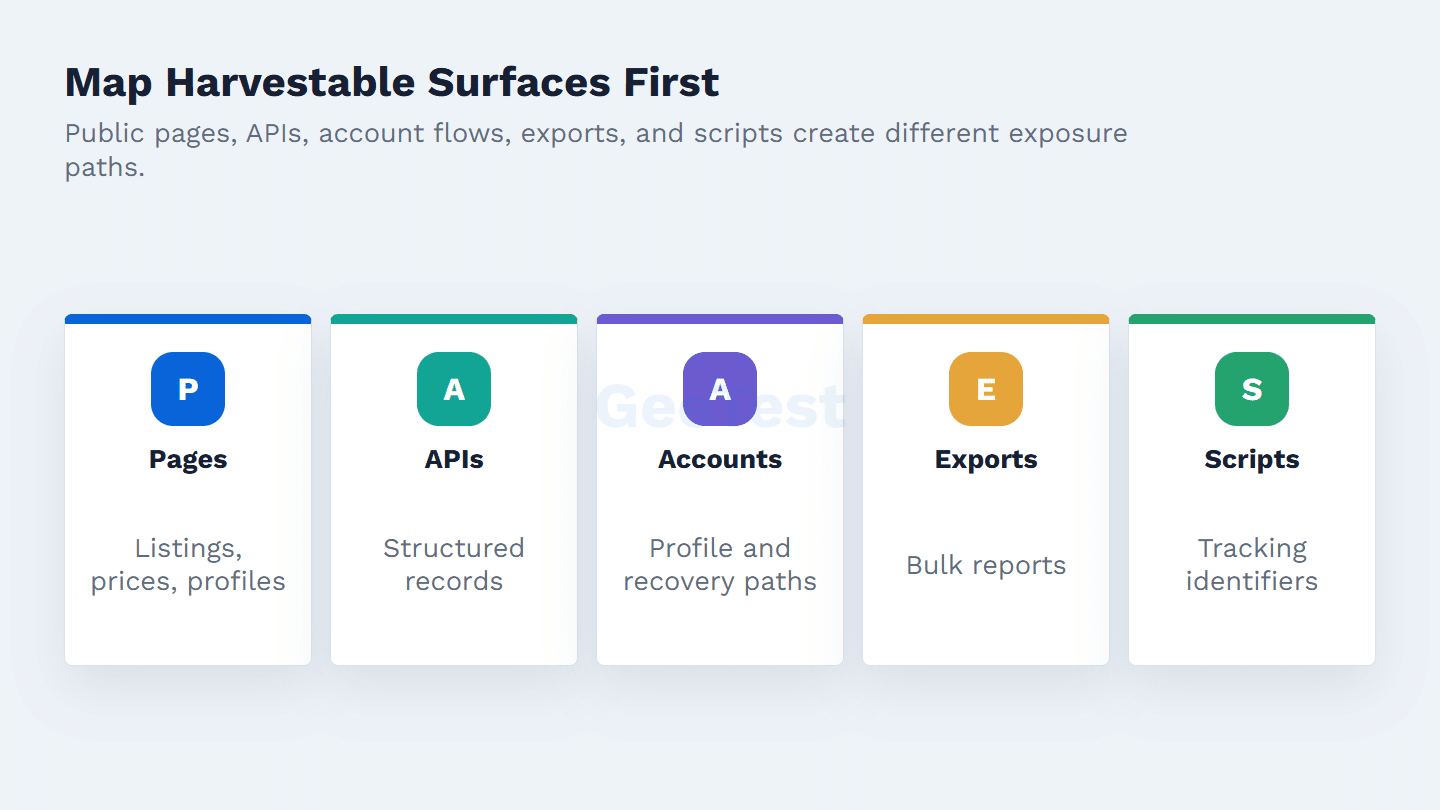
A useful inventory is not a spreadsheet of URLs. It is a risk map. Public product pages may reveal prices and inventory. Search APIs may return structured records at speed. Account flows may leak recovery clues. Export tools may turn small browsing sessions into bulk collection. Third-party scripts may move identifiers and behavior data outside the core application.
Give each surface an owner. A product-listing API may sit between engineering and commerce. An export tool may belong to operations. A tag review may need security, privacy, procurement, and marketing in the same room. If nobody owns the surface, controls tend to age badly after the first release.
Classify each surface by value and exposure. A marketing article may be public by design. A product catalog may be public but commercially sensitive at scale. A logged-in account page may expose personal or transactional context. An API response may combine fields that look harmless alone but become valuable when collected repeatedly. The prevention plan should start with the surfaces where repeated collection creates the largest business, privacy, or fraud loss.
Do not forget indirect surfaces. Autocomplete endpoints, image metadata, structured data, search filters, old mobile API versions, partner feeds, and analytics tags often expose cleaner signals than the main page. In practice, the harvesting path is frequently the cheapest machine-readable path, not the prettiest customer-facing path.
Separate Legitimate Collection From Abusive Extraction
Not every collection workflow is hostile. Product analytics, fraud monitoring, customer support, access control, and research can all involve expected data movement. The line starts to move when collection becomes hidden, excessive, automated without permission, or unrelated to what users and site owners reasonably understood.
This distinction matters because the response is different. The FTC’s guidance on how websites and apps collect information is useful for privacy review, especially around identifiers, permissions, cookies, pixels, and app behavior. Public crawl projects such as Common Crawl show the other side of the issue: a crawl can be public and transparent while still requiring site owners to decide what they want exposed.
Build a Layered Prevention Stack
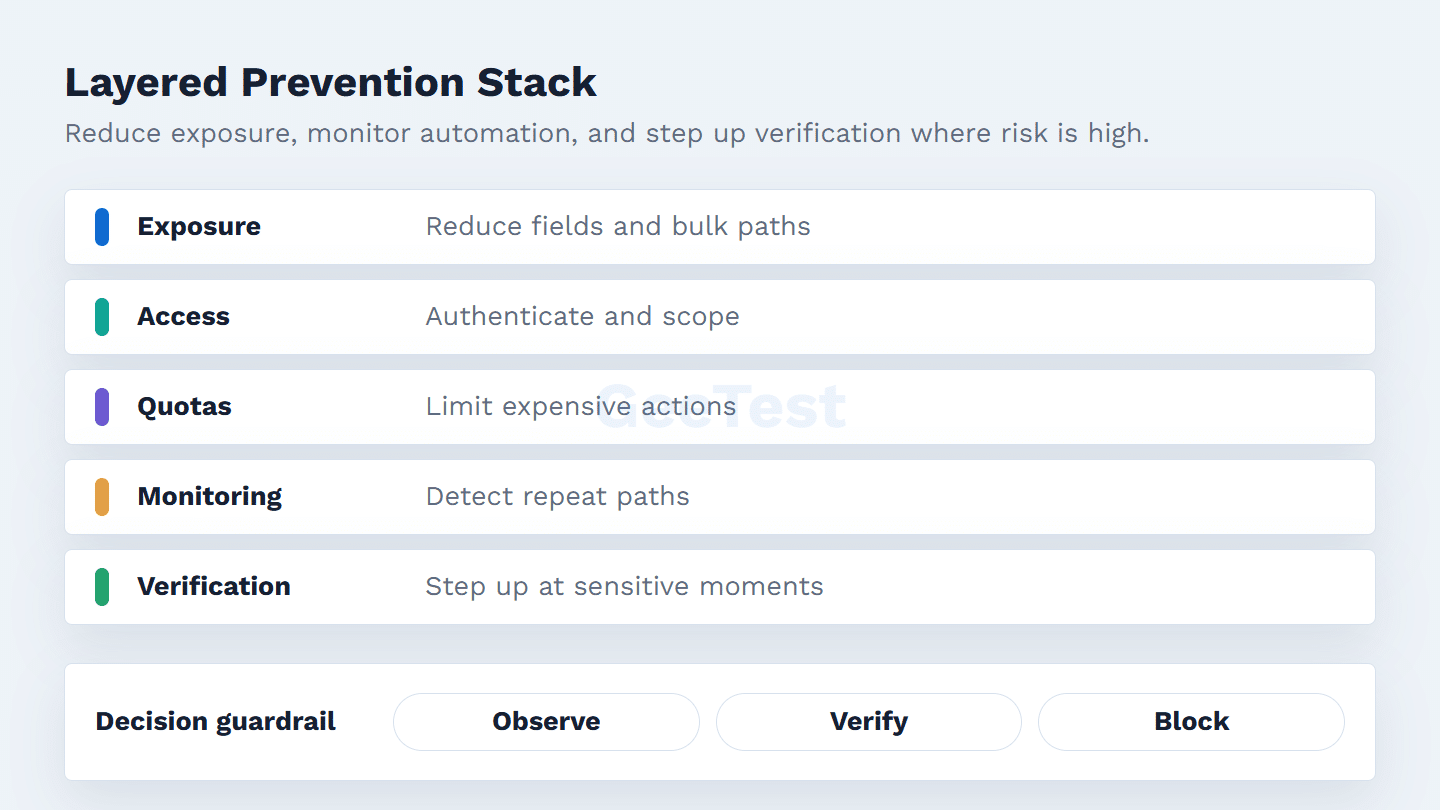
There is no single harvesting switch. Start with exposure reduction: remove unnecessary fields, cap generous pagination, avoid default bulk exports, and keep private data behind authentication and authorization. For APIs, OWASP API4:2023 Unrestricted Resource Consumption is a good reminder that volume, cost, and resource limits are security controls, not only reliability settings.
Then make repeated collection more expensive. Quotas, rate limits, scoped tokens, response-size caps, country or phone-range checks, and export alerts all help, but only when tied to the surface they protect. Robots.txt can guide cooperative crawlers; Google’s robots.txt documentation also makes clear why it should not be treated as a shield for sensitive data.
For public pages, the stack usually starts with crawl policy, caching, pagination limits, and anomaly monitoring. For logged-in flows, it needs stronger identity, session, and authorization checks. For APIs, add token scope, per-action quotas, response-size limits, schema review, and abuse alerts. For exports, add reason codes, volume thresholds, delay or approval paths, and review logs.
The best stack is boring to operate. Each control should have an owner, a dashboard, a rollback path, and a reason for existing. If a rule only says “block scrapers,” it will be hard to tune. If it says “slow repeated unauthenticated search across high-value product filters,” the team can discuss false positives and business impact clearly.
Detect Bot-Powered Harvesting Signals
Harvesting traffic often avoids a dramatic spike. The pattern may be a steady scrape of deep pagination, unusual query combinations, repeated exports, scripted timing, low session depth with high data volume, or many accounts touching the same lookup flow.
IP reputation is useful but incomplete. Modern harvesting systems rotate addresses, emulate browsers, reuse real-looking sessions, and distribute work across accounts. Stronger detection compares device consistency, browser integrity, account relationships, timing, payload repetition, navigation depth, and the business value of the surface being touched.
Use Risk-Based Verification at Sensitive Moments
Challenge every visitor and the product team will feel it. Challenge nobody and extraction stays cheap. A more workable approach is to add friction at moments where the request is about to unlock value: signup, login, account recovery, checkout, coupon use, review submission, bulk search, export, or repeated account lookup.
Device Fingerprinting can support device-level risk analysis, especially when IPs rotate or sessions look newly created. It should still feed a broader policy that considers behavior, account history, flow sensitivity, and false-positive cost. At high-risk moments, GeeTest Adaptive CAPTCHA can add proportional verification while allowing ordinary sessions to continue with less friction.
Use verification as a step-up response, not as the whole strategy. A normal session can continue. A suspicious session can be slowed or challenged. A clear automation cluster can be blocked or reviewed. A valuable partner or accessibility tool may need an allow path with monitoring. This graduated model protects conversion better than forcing every visitor through the same challenge.
The verification trigger should be explainable. Examples include many accounts from one device cluster, high data volume with shallow navigation, repeated failed lookups, export attempts from new accounts, or a search pattern that walks through every filter combination. When product teams understand the trigger, they can help tune it instead of seeing security as a black box.
Use the same discipline for allow paths. Search crawlers, partner tools, accessibility services, marketplace feeds, and internal operations may need access that looks unusual in a bot report. That does not mean they should bypass monitoring. Give each exception a named owner, a purpose, an expected volume range, and a review date. An exception without an owner slowly becomes a harvesting gap.
Review Privacy, Legal, and UX Tradeoffs
Controls can create their own damage. A rule that blocks harvesting may also block search crawlers, partners, accessibility tools, or high-value customers during unusual traffic. Privacy and legal teams also need to review notice, consent, minimization, retention, and third-party collection.
Before rollout, ask three plain questions. Does this control target the actual harvesting path? Is the protected surface valuable enough to justify friction? Can support and product teams explain the decision to a legitimate user? If the answer is unclear, measure first or narrow the control.
Roll Out Controls in Phases
Begin where abuse is easy to automate and expensive to ignore: search, exports, login, coupon redemption, account recovery, review submission, and APIs that return structured records. Add monitoring before hard blocks so the team can see how normal users behave. Keep rollback paths for rules that accidentally raise support tickets or hurt conversion.
Review the policy after product releases, endpoint changes, traffic spikes, new tracking scripts, search-indexing issues, and support complaints. Harvesting risk moves as the product moves.
A sensible rollout often has four passes. First, observe the surface and estimate normal behavior. Second, reduce unnecessary exposure and fix obvious access-control gaps. Third, add rate, quota, and response-size controls with clear exceptions. Fourth, add risk-based verification or blocking only where monitoring shows repeated extraction. That sequence keeps teams from buying friction before they know which surface actually leaks value.
Document decisions as you go. The record should show which field, endpoint, or flow was protected; which signal triggered the control; who approved it; and what metric would cause a rollback. This is especially useful when privacy, legal, SEO, and product teams disagree about crawler access or data minimization.
For mature teams, the phase plan should become part of release review. New search filters, new exports, new API versions, or new third-party scripts should not launch until someone has asked whether the change exposes cleaner data, creates bulk access, or changes the expected crawler profile.
This keeps prevention tied to product change, not periodic guesswork.
Measure Whether Prevention Is Working
Good prevention lowers abusive collection without punishing ordinary users. Track security and product signals together: repeated request volume, export attempts, API quota pressure, suspicious device clusters, failed verification rate, support tickets, login completion, checkout conversion, and crawler complaints.
Look by surface instead of only sitewide. Search pages, APIs, account flows, coupon flows, review flows, and exports each have a different abuse pattern. If abuse drops but support tickets rise, the control may be too blunt. If friction stays low but extraction continues, the control may be too weak or too late in the flow.
FAQ
1. Is robots.txt enough to stop data harvesting?
No. Robots.txt is useful for cooperative crawlers, but sensitive data needs server-side access control and abuse monitoring.
2. Is data harvesting the same as web scraping?
No. Web scraping is one collection method. Data harvesting also includes collection sources, preparation, storage, and later reuse.
3. Can data harvesting be stopped completely?
Not in a practical sense. The goal is to reduce exposure and make abusive extraction harder to scale with access control, quotas, monitoring, device signals, and risk-based verification.
4. Where should we start first?
Start with flows that expose valuable data at scale: search, exports, login, coupon redemption, account recovery, reviews, and APIs that return structured records.