
Quick Answer
A CAPTCHA challenge is a step-up verification task shown when a request looks risky enough to justify friction. It may be a checkbox, image puzzle, audio task, text task, or another challenge-response flow.
For business teams, the important question is not “how do users solve the puzzle?” It is “when should this challenge appear, what signal triggered it, and what happens if a legitimate user cannot pass?”
In a bot-management strategy, a CAPTCHA challenge should be a controlled policy response at sensitive moments: signup bursts, login anomalies, password reset abuse, checkout attacks, high-volume form submissions, scraping, or suspicious account behavior. It should not become a permanent wall for every normal session.
For enterprises, the right question is broader: what kind of CAPTCHA can reduce automated abuse without training good users to expect friction? A modern answer combines adaptive challenge selection, device and behavior signals, policy controls, and measurable recovery paths.
What a CAPTCHA Challenge Should Decide
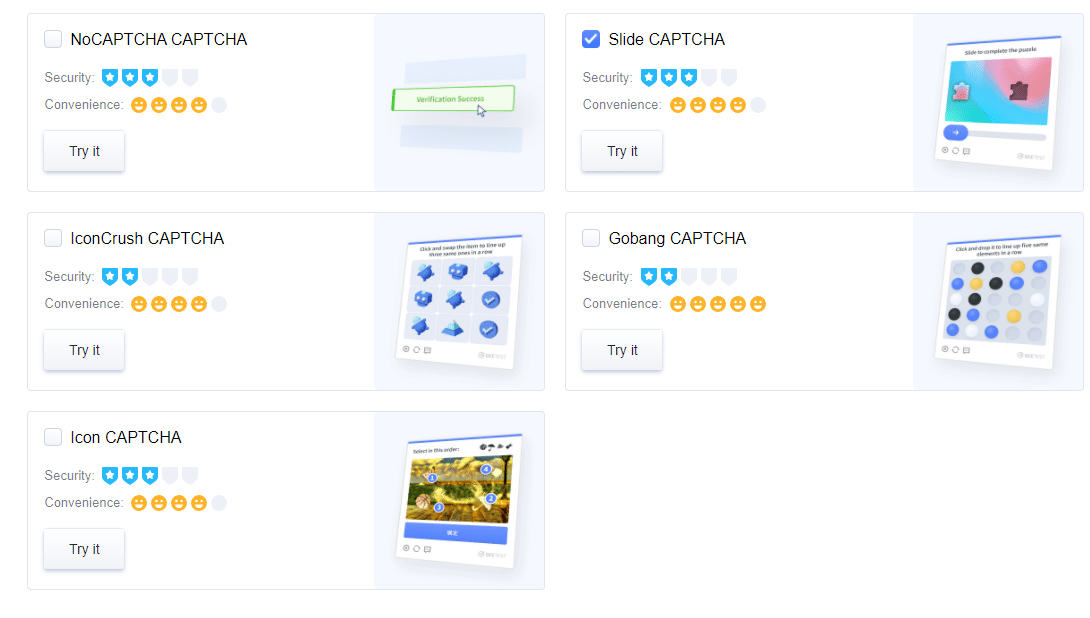
A CAPTCHA challenge is a verification step that asks a user to prove they are likely human before a protected action continues. It exists because automated abuse can imitate ordinary web traffic at scale.
The OWASP Automated Threats project is helpful context because it separates automated abuse into different threat events, including account creation, credential attacks, scraping, and CAPTCHA defeat. A challenge may reduce some abuse patterns, but it is not the whole defense.
Public forums, developer questions, videos, and social posts often use “captcha challenge” loosely. Some people mean a security puzzle. Some mean a game-like task. Some mean repeated verification frustration. For B2B security and product teams, the practical angle is trigger policy: when the challenge should appear, when it harms user experience, and what risk controls should happen before or instead of it.
When Should You Trigger a CAPTCHA Challenge?
Trigger a challenge when two conditions are true: the action is valuable enough to protect, and the available risk signals are ambiguous enough that a human check is useful.
| Situation | Challenge decision | Reason |
|---|---|---|
| Normal browsing or low-risk content view | Avoid | Friction is higher than the security value. |
| Known device and normal login behavior | Avoid or silently monitor | A visible test may create unnecessary abandonment. |
| Login velocity spike, new device, proxy pattern, or failed attempts | Trigger or step up | The action is sensitive and risk is elevated. |
| Signup burst with repeated device or network patterns | Trigger | Fake accounts can create downstream fraud cost. |
| Password reset, account recovery, payment, or coupon redemption | Trigger selectively | Abuse impact is high, but recovery must stay accessible. |
| Confirmed automated attack pattern | Block, throttle, or review | A puzzle may waste user time without stopping the attack. |
Selectively is the key word. If a user gets challenged after every pass, the policy is too coarse. If bots pass while real users fail, the challenge type is probably the wrong control for that attack.
Where CAPTCHA Challenges Hurt UX
CAPTCHA friction becomes a product problem when it interrupts intent at the wrong moment. A challenge can break conversion when it appears before users understand the value of the action, uses a task they cannot complete, repeats after success, fails without recovery, or loads slowly on a mobile network.
Accessibility needs particular care. The W3C’s CAPTCHA accessibility guidance explains why visual or cognitive tests can exclude users when no usable alternative exists. That does not make every challenge unusable. It means production teams need keyboard support, clear instructions, non-visual options where appropriate, and a support route for repeated failure.
For growth and product teams, solve rate is not enough. Track challenge rate, pass rate, retry rate, abandonment after challenge, latency, support tickets, and abuse that still gets through. A challenge that works in a test environment can still be a poor production control if it drives away good users.
What Modern Enterprises Need From CAPTCHA
Modern enterprises do not need a harder puzzle by default. They need a verification layer that is selective, explainable to internal stakeholders, and easy to tune when abuse patterns change.
| Enterprise need | What it means for CAPTCHA design | Why it matters |
|---|---|---|
| Risk-based display | Show a challenge only when signals justify it | Protects conversion and reduces fatigue for normal users |
| Adaptive challenge type | Match the verification task to device, region, flow, and risk | Avoids one static test becoming either too easy for bots or too painful for users |
| Signal-aware policy | Combine behavior, device, velocity, session, and action value | Lets teams respond before a visible challenge is needed |
| Business-rule control | Let fraud teams tune policies without waiting for a full release | Keeps defense aligned with campaign spikes, launches, and seasonal traffic |
| Recovery and accessibility | Provide alternatives when legitimate users fail | Reduces false-positive damage and support load |
| Operational metrics | Track challenge rate, pass rate, retry loops, abandonment, and attack leakage | Separates real risk reduction from visible friction |
This is the natural bridge from “captcha challenge” as a search term to CAPTCHA as an enterprise control. A challenge is only the visible step. The stronger system decides when that step should appear, what happens before it appears, and how the business learns from the outcome.
For teams still choosing the right control family, GeeTest’s advanced CAPTCHA guide is useful background on why modern CAPTCHA is more than a static puzzle, while the CAPTCHA vs Honeypot comparison helps teams decide when low-friction traps are enough and when a stronger human-verification step is needed.
Better Trigger Policy and Alternatives
A reliable policy usually has three tiers:
- Low risk: allow the request without a visible challenge.
- Medium risk: show a CAPTCHA challenge or another step-up action.
- High risk: block, throttle, require account recovery, or route to review.
The policy should combine several inputs: device consistency, session history, IP and network signals, behavioral timing, failed attempts, velocity, business action value, and known attack patterns. The exact mix depends on the product and privacy constraints.
This is where GeeTest should not be treated as a decorative CAPTCHA replacement. GeeTest Adaptive CAPTCHA is useful because the visible challenge can become the medium-risk step-up layer, not the default experience for every user. In practice, that helps teams protect sensitive actions while keeping low-risk sessions moving.
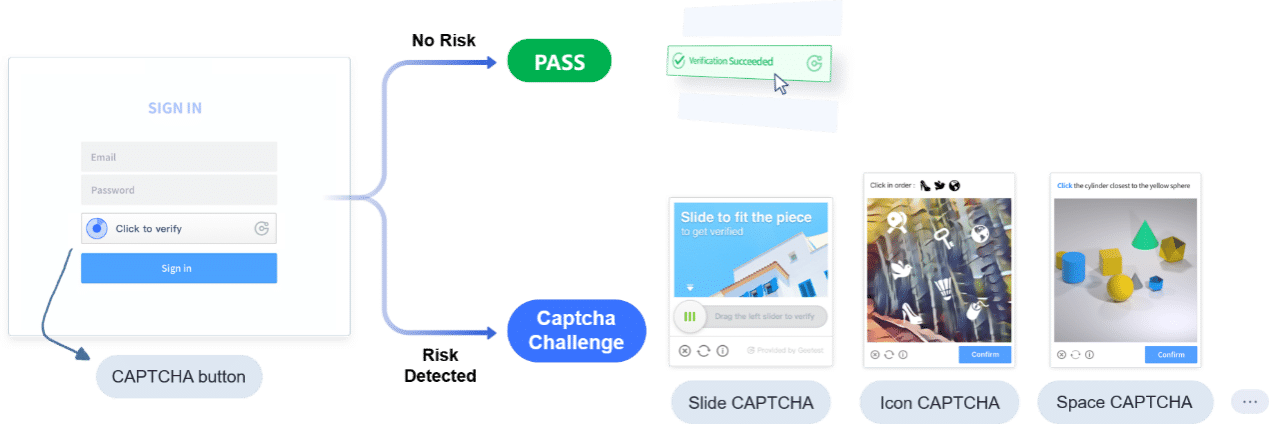
The broader GeeTest bot management portfolio matters because a challenge is only one action. Device and behavior signals can support risk assessment before the challenge appears. The Business Rules Engine can help fraud teams orchestrate observe, challenge, throttle, block, or review policies without turning every threshold change into an application-code release.
That is the product-level advantage this topic needs to make clear: GeeTest is strongest when the business wants adaptive verification, bot-management context, and post-launch policy control, not just a puzzle embedded on a form.
What to Use Before or Instead of a Challenge
A visible challenge is only one possible response. Other controls can reduce abuse with less friction:
- Passive risk scoring for low-risk sessions.
- Rate limits for obvious volume spikes.
- Device or session consistency checks.
- Honeypot fields for simple form spam.
- Email, phone, or MFA step-up for account-sensitive actions.
- Server-side token validation after a challenge pass.
- Business rules that can run in observation before enforcement.
The goal is not to eliminate every challenge. The goal is to spend user attention only when it buys meaningful risk reduction. GeeTest’s CAPTCHA options guide helps teams compare challenge and non-challenge approaches, while the CAPTCHA accessibility guide supports the human side of verification review.
For an enterprise buyer, this also changes vendor evaluation. Ask whether the provider supports adaptive challenge selection, whether policy can reflect business risk tiers, whether the service gives operations teams enough telemetry, and whether deployment support covers login, signup, checkout, promotion, and high-volume form abuse separately.
Design, Recovery, and Metrics
Good challenge design is predictable, recoverable, and measurable.
Start with plain language. Tell users what is happening without implying guilt. Keep the challenge inside a trusted page context. Do not ask users to download files, paste commands, disable browser protections, or leave the page for unexplained tasks.
Then build recovery. If a user fails twice, provide an alternative route. If the challenge fails to load, show a safe message and support path. If a user has accessibility needs, do not force a single visual puzzle as the only option.
Finally, review the data after launch. A sudden increase in challenge rate may mean attackers changed behavior, but it may also mean a browser update, CDN routing issue, proxy pattern, or policy threshold is hurting legitimate users.

Metrics That Separate Security From Friction
The most common reporting mistake is treating every completed challenge as success. A user can complete a challenge and still abandon the journey because the interaction broke trust or added too much time.
A better dashboard separates three groups:
- Security: attack volume, suspicious signups, credential-stuffing patterns, spam submissions, and abuse that still passes.
- UX: challenge rate, first-pass success, retries, failure loops, latency, and abandonment after challenge.
- Operations: support tickets, false-positive reviews, threshold changes, and time to update policy.
Review these metrics by flow. A checkout challenge, password reset challenge, and comment-form challenge should not share the same thresholds without evidence.
Implementation Mistakes and Playbook
One common failure mode is using CAPTCHA as a permanent patch for a different control gap. If an endpoint has no rate limiting, no server-side validation, and no abuse monitoring, a puzzle becomes an expensive front-door decoration.
Another failure is treating every suspicious signal as equal. A new device, a high request rate, and a failed login burst should not automatically trigger the same response. Risk policy needs levels.
A third mistake is forgetting recovery. Real users fail challenges because of assistive technology, privacy extensions, unstable mobile networks, browser script issues, or unclear image instructions. If the only option is “try again,” the challenge is a dead end, not a controlled security step.
Implementation Playbook
- Map protected actions: login, signup, checkout, posting, password reset, coupon use, API-like form submission.
- Assign business risk to each action.
- Define low, medium, and high-risk signal combinations.
- Choose the least disruptive control for each tier.
- Add accessible fallback and support handling.
- Validate challenge tokens server-side before trusting a pass.
- Monitor challenge rate, pass rate, retry rate, abandonment, and abuse reduction.
- Review thresholds after launches, seasonal traffic changes, and attack spikes.
This playbook keeps the CAPTCHA challenge in its proper role. It is not a magic test of humanity. It is one decision inside a fraud-control workflow. GeeTest’s advantage is most visible when the enterprise treats that workflow as a living policy system: adaptive CAPTCHA for step-up verification, risk signals for pre-challenge judgment, and business rules for response orchestration.
Final Takeaway
A CAPTCHA challenge is useful when it is triggered by real risk, accessible to legitimate users, and measured after launch. It becomes harmful when it is used as a blanket wall. Treat it as a step-up control inside bot management, not as the whole strategy.
For GeeTest buyers, the practical takeaway is straightforward: choose a CAPTCHA stack that can adapt to risk, preserve conversion, support fraud-team policy, and improve after launch. That is where adaptive CAPTCHA and bot management become more valuable than a static challenge alone.
FAQ
1. What is the CAPTCHA challenge?
A CAPTCHA challenge is a verification task that asks a user to prove they are likely human. It can be a checkbox, image puzzle, audio task, text challenge, or risk-based step-up shown when a request looks suspicious.
2. How do you solve a CAPTCHA challenge?
Follow the on-page instructions, use an accessibility option if one is available, and avoid any prompt that asks you to download files, paste code, run commands, or disable protections.
3. What is a CAPTCHA challenge-response?
Challenge-response means the system presents a task and checks the user’s response before allowing the action to continue. In modern bot management, the response is usually combined with server-side validation and risk policy.
4. Are CAPTCHA challenge games the same as security CAPTCHA?
No. A game may imitate the format for entertainment. A production CAPTCHA challenge is part of a security and abuse-prevention workflow.
5. When should teams choose adaptive CAPTCHA over a static challenge?
Teams should evaluate adaptive CAPTCHA when different flows have different risk levels, when false positives matter, and when fraud teams need to tune challenge behavior after launch.